
Once you have selected a meeting from the Meetings List you will be taken to the Analyser screen.
This is the most complex part of the system to understand and master. The main functions are described below.
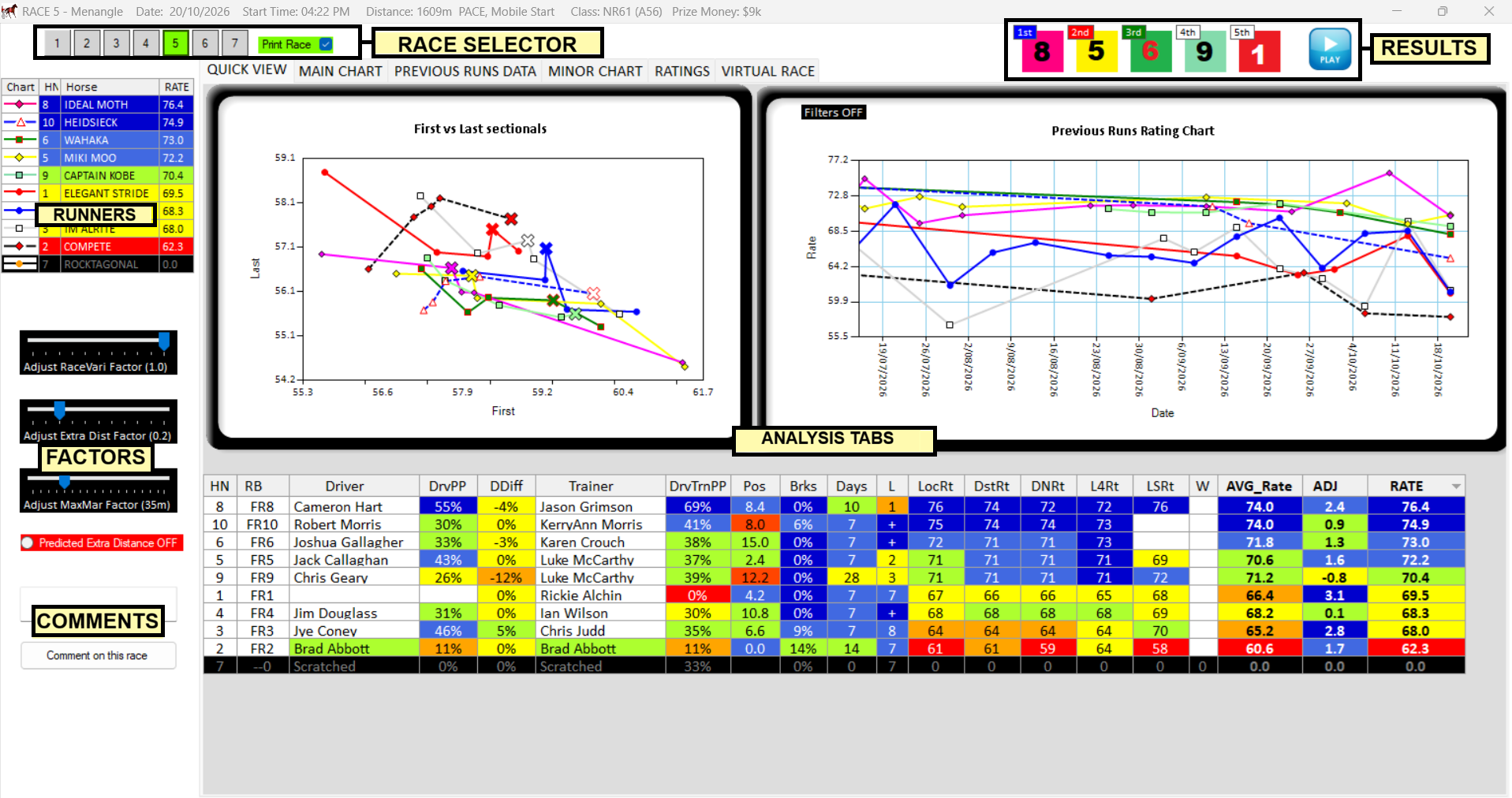
The form header contains details of the selected race.
Race Selector – Choose the race to analyse by clicking on the race number. Use the Print Race toggle button to include / exclude the race from your reports.
Print Race Checkbox – Beside race selector, this is default ticked which means the race will print in reports. If you untick this for any race, that race won’t print in reports.
Results – The results are downloaded from the main form after the race (Typically the next day). When results are available they will be displayed in this area on the form, with a link to the race results from HRA. The charts will also contain the new points for this race.
Runners – This is the list of runners for the selected race. You can select a runner from this list and information specific to that horse will display on some of the tabs. The runners list provides the overall rating for each horse. This list can be ordered by horse number, horse or rating by clicking the header of the list.
If you right click on a runner the following menu is available:

Scratch Horse – Scratched the horse that you clicked on. Confirmation is required before removing the horse from the analysis. NOTE: If you scratch a horse you cannot un-scratch it.
Make Comment on Horse – This option will bring up a form that will allow the user to make a permanent comment on the selected horse. The comment will be placed into “Your Notes” and be made available on the horse each time it runs. When you hover the mouse over the yellow highlighted name, your note will appear at a tip and in a box under the runners list. If you chose this option on a horse that already has a comment you will be able to edit or delete the comment.
ANALYSIS TABS – Each of these tabs provides different information and ways to change your ratings. Tab include:
Quick View (Default), Main Chart, Previous Runs Data, Minor Chart, Ratings and Virtual Race:
Main Chart – Select from Ratings, Mile Rates or Lead Times over time. Apply filters. See Charts
Previous Runs Data – View all runners previous data and get summary information and individual speeds. See Previous Runs
Minor Chart – Time first / last and Ratings Min / Max. See Charts.
Ratings – View each horses ratings in detail and adjust how they are applied. See Ratings.
Virtual Race – Visual indication showing predicted positions in running and the predicted finish based on your psoitions and factors. Learn more here Virtual Race Page.
Factors – These factors are applied to all previous runs and affect the overall and sectional times and ratings. More information on these can be found here.
Comment on this race Button
When you click on this button you can make and save a comment on the race or any horse in the race. You can also decide if you want to remove the run from analysis. The following screen will appear when you click this button.
Either make a comment in the top area to comment on the race or Make individual comments on any horse and/or select whether to use the run in future analysis. You must press save and close to save the records. Delete will delete any comments made.
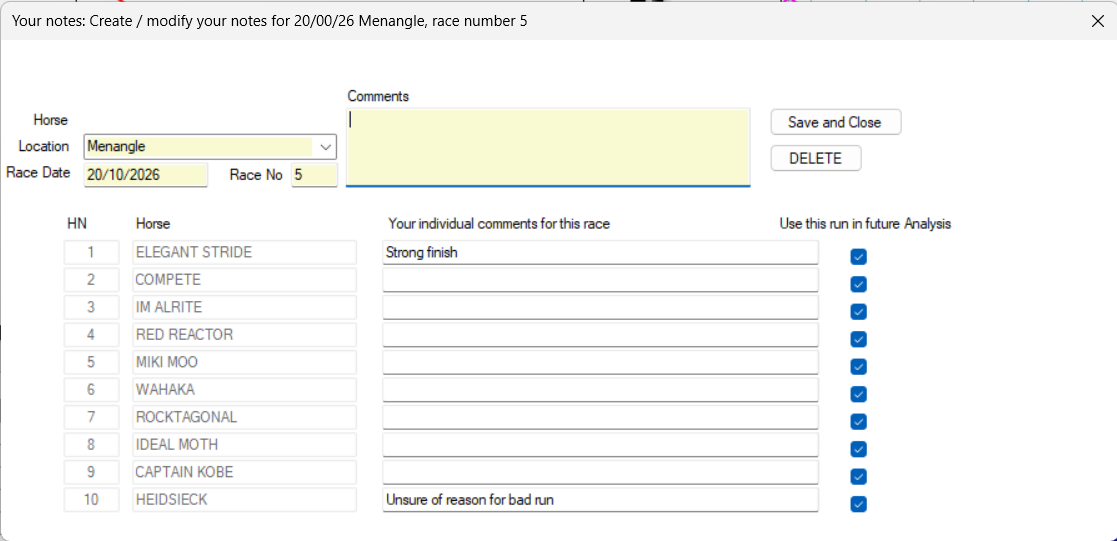
Race Comment – Write your comments / tips in this area. This will display on your Race Reports.