
The Previous Runs Data tab provides a detailed look at all previous runs for horse. The functions are explained below:

Display information View
This tab provides detailed view of each horses previous runs. They are colour coded to make the information easier to see. Generally the colours indicate the following:

Rows in previous runs that are greyed out on the right hand side indicates they are not included in calculations. This is due to the run being outside the factors you have set or you have unticked the Use option for that race.
At the top of the tab is a grey button that will change the tab view from information to sectionals.

Display Sectionals
View All Button and select number of previous runs – This button will display all runners data for the set number of races in the selection list beside it. Once results have been imported you can select “This Race” from the list to view the results.
This Race information – The area immediately above the previous runs table headings shows information on todays race to compare with the list and displays the current selected horse’s information for today above the columns to compare.
Average / Best Rates – whatever data is in the previous runs list the best and average are displayed on top of the ratings column.
Best time and average times appear for all sectional time related columns.
The information display within the data is self explanatory for Information Display but the Sectional Display takes a bit more to understand.
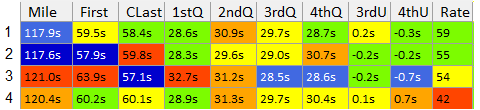
Columns Explained:
[Mile] is the adjusted Mile depending on your settings.
[CLast] is the calculated Last 2 Quarters of the race with all adjustments provided.
[First] is the first part of the race: [Mile] – [CLast]
[1stQ] is a calculated first quarter for the previous race. This is not the individual horse’s first quarter. It is also adjusted. It is calculated by the left over of the [Mile] minus the 2nd, 3rd and 4th quarters.
[2ndQ] is the previous race second quarter. It is adjusted based on your settings.
[3rdQ] is the individual horses 3rd quarter, adjusted for this race.
[4thQ] is the individual horses 4th quarter, adjusted for this race.
[3rdUpDwn] is how much quicker / slower the horse was compare to that races average 3rd quarter. -ve is quicker, +ve is slower. This is not adjusted and is based on the actual sectionals run.
[4thUpDwn] is how much quicker / slower the horse was compare to that races average 4th quarter. -ve is quicker, +ve is slower. This is not adjusted and is based on the actual sectionals run.
The colour coding for this section of the table is also different to the rest of the table. All other colours are comparing vertical values but the sectional times are comparing the speed across that race. Lets consider the data below:
This is a powerful view as it shows how each race panned out. Was the race Slow, slow, sprint home or a stop start race or quick pace and slow finish.
This information can tell you how the horse will performance in similar races.
Removing a previous run
This is an important part of the analysis. The user can choose to de-select any previous run and see how it changes the ratings.

The “Use” column header is highlighted yellow so you know you can change it. If a run is green and ticked it is included in calculations, Orange and unticked means you have removed it. When you click this cell a dialog box appears.
If you answer Yes the run will be removed and charts and ratings re- calculated. A record will be added to My Notes so this run will be removed in future races where this horse is running.
Answering No will just remove it for this race analysis only.
If the run is unticked and you click on the record, the message will change asking if you want to add this run back into the analysis.
Race information / Replays
If the Link column is blank this means the link to HRA race information hasn’t been provided. If they are not available you will have to find them yourself on Harness Racing Australia results page.
Individual Run Info (Footer)

When you select any run displayed in the Previous Run Information List you will be able to view that individual run in the area under the list.
This display provides the same coloured as mentioned above for the sectionals as well as position in running information and race comment.
The halfs and quarters are displayed in speed for those who prefer information in this format.
Note between positions in running there is additional information that isn’t in the previous runs data. It shows how much ground (in metres) the horse made or lost between 800-400 and 400-Finish. This footer area breaks a race down. The image provided shows are relatively slow mile. The race had a slow first half and the horse was much quicker in the final quarter. But becasue the race was run slowly, the horse made no ground.