
The virtual race provides useful information about horses running position and how it may affect the race outcome. The display provides an upper and lower part. The upper part provides the positions at the 800m marker that can be modified by the user and the lower part provides the predicted race finish.

In the left middle section of the screen any missing horses are displayed (either scratched or no data).
An information button provided in the top left of the display provides information on how horse movement works. Along the top is some useful details about the track for this race. On the right is a display of the predicted first half of the race. This is calculated based on the leading horses average speed in previous runs.
Understanding the Position in running and labels
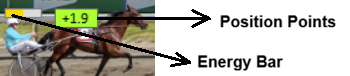
Each horse have 2 items shown on their image.
Energy Bar – This shows how much energy the horse has left at the 800m marker. This bar looks at race pace from the horses previous runs and compares it to today’s pace and position to work out how much energy it has used to be in the predicted position. When you move a horse the energy bar will change as you drop it into a new position.
Position Points – This is the adjustment that will be made to the ratings for the predicted position. This is taken from the ratings view. Once you change a horses position and they are all moved, these adjustments will get updated for all horses. If you have the [PosRt] column in the Ratings View set to Off, Medium or Full the recalculated value will be displayed.
Moving a horse
You are able to move individual horse positions by clicking on them and holding the mouse button in while you move them around the top part of the screen (Drag and drop). You can drag them over the top of other horses. You are limited to put horses on the rail, 1 wide or 2 wide.
When you drop a horse a number of things occur:
1 – The horses are re-ordered so there are no clashes. If you decide to drag a horse further out the back, it will not jump back up behind the last horse. Also if you drag a horse to the 1 or 2 wide 2 and make it closer to the leader, it will stay there and all other horses will be lined up behind that point.
2 – Once all horse positions are re-ordered, all calculations are re-run. Both the energy bars and the position points may change for each runner depending on the change made.
3 – The result on the lower part of the screen will change.
you will see the Energy Bar value change if the new position affects the amount of energy used. The Position Points don’t change until you finish editing.
The horses position in running is one of the biggest variables you will have to deal with. For advanced users you can sit for hours pouring over what may happen in a race. It is very difficult to get inside every drivers head and every horses behavior so you are still probably not going to get it perfect. We suggest to have a bit of fun with this. If you enjoy doing it spend some time on it, otherwise just check a few critical changes and see how it affects the result.
Rember – In an ideal race all Position Points would be zero. This would mean the horse is comfortable with the pace and position. If you have large positive or large negative numbers for Position Points you should look at trying different positions for those horses. Similar for energy. If a horse has no energy left it might mean it should be running further back in the field.
Result (Lower part of screen)
Calculating virtual races is complicated. The predicted finish is calculated based on sectional times and all the factors applied. The basic theory in the result is
1 – Calculate the predicted speed of each horse given previous race sectionals, adjusted for speed and energy left in this race.
2 – Apply the calculated speed to each horse and see if they can catch the leader.
3 – Display the result.
The finish result may not be the same as the ratings results. This is because the virtual race is like real life. The horse might be very quick but will it be able to catch the leaders from its position and with the pace of the race today.
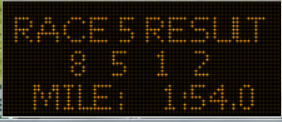
A display board near the finish line provides the top 4 result and the predicted Mile for the rate.
Horses with no data
Sometimes a horse is having a first start or coming from another country that the program has no data for. In that instant the horse is left out of the race. They will be placed in the middle left of the screen in a labelled box to remind the user that this horse cannot be analysed or is scratched and therefore isn’t available for predicted position.
Practicing the use of this Analysis should be helpful in the long run. It takes a while to understand how to predict positions. I suggest a thorough look at previous runs.