
The following steps need to be taken for installation:
1. You will receive an e-mail with a software download link. Single Click on the Link (Setup file)
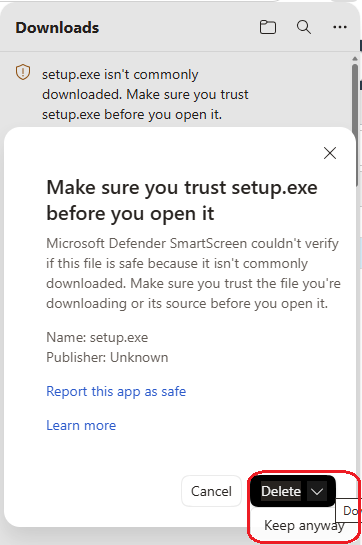
The download link will download from a web page and a small icon will appear beside the address bar. It is likely to come up as not trusted. Different Windows version handling this differently but you need to find the Keep option to get a dialog box like above and change the delete button to Keep anyway. The file will then download. Open the file or the folder and double click on the setup.exe file. The file will typically be saved into your Download directory.
2. Find the downloaded file on your hard-drive and run the setup.exe file.
3. Follow the prompts on the screen.
For screen shots on the installation process go to the following web page:
https://pjdata.com.au/support/
If you have any issues with installation PJ Data will be there to help.