
Main Chart
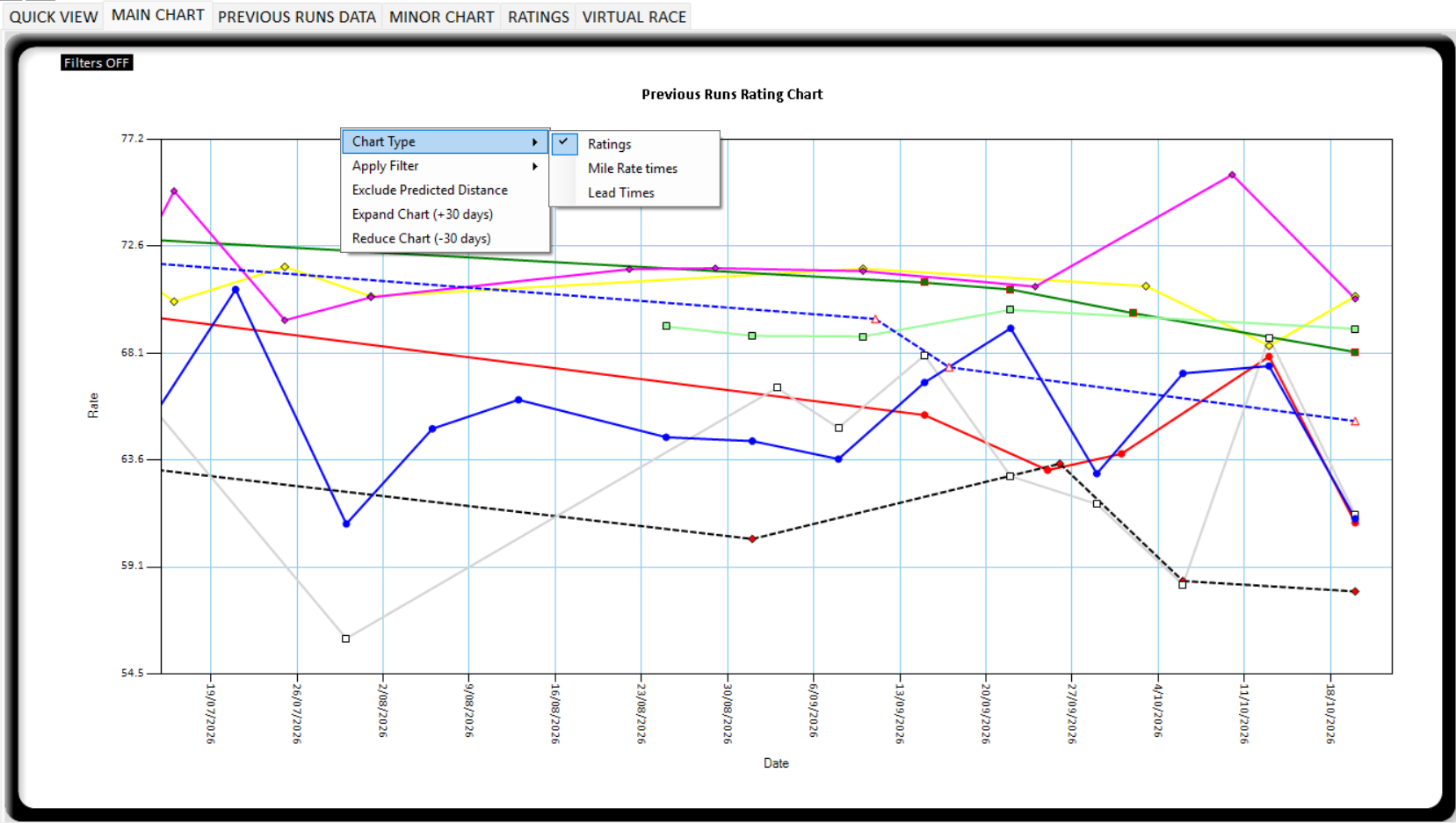
This chart displays the Ratings/Times for each horse graphically. It will display all valid runs depending on your filtering and factors applied. The data displayed for each horse is filtered based on the settings and the slider bar factors that you can alter to change the calculations. In addition you can exclude/include any horses previous run from appearing on the chart.
If you right click anywhere on the main chart a popup menu will appear with the following options:
CHART TYPE – Choose from 3 charts:
Ratings – Default chart displaying the calculated ratings for each previous run.
Mile Rate times – Calculated Mile Rates for each previous run including all factors and adjustments to bring the time back to the current track / distance / gait. (Lower is better)
Lead Times – Calculated lead times for each previous run including all factors and adjustments to bring the time back to the current track / distance / gait. (Lower is better)
RATINGS/TIMES ARE A CALCULATED RATE FOR EACH HORSE FOR EVERY PREVIOUS RUN. THEY ARE CHARTED ABOVE THE DATE OF THAT RUN.
FOR RATINGS CHART – THE BIGGER THE NUMBER THE BETTER THE RATING. Better performances will be on top of chart.
FOR TIMES CHARTS – THE SMALLER THE NUMBER THE BETTER THE TIMES. Better performances will be on bottom of chart.
APPLY FILTER – There are 3 filter options and any of these can be selected or all of them. When they are selected the filters are shown in the title bar of the chart.
Current Location – The chart will only display previous runs if they are at the same location as the current race.
Distance – Chart will display runs within 150m of the current race distance.
Start Type / Gait – The chart will exclude runs of dissimilar Gait or start type.
When a filter is applied, it will display in the top left of the chart:
Filters On: [Same Location] [Similar Distance] [Same Gait/Start Type]
Include Predicted Distance – This flag when selected will add on the extra predicted distance run based on the width of the horse in the virtual race. This is an important check for horses that are in row/barrier that is significantly different than previous runs. Notice it won’t change the ratings but it does adjust the times in the Minor chart. This is because the predicted position is already part of the ratings without this checked. This is the same as the toggle button in the factors part of the main analyser area. Change one and they will both change.
Expand Chart (+30 days) – This will expand the horizontal axis of the chart with the race date in case you want to look further back. The chart is initially set to far enough back to display all runners.
Reduce Chart (-30 days) – This will reduce the display on the horizontal axis with the race date in case you want to look in closer to the race date only. The chart is initially set to far enough back to display all runners.
Hover information
If you hover your mouse over any point on the chart it will provide you information on the associated run. For example:
[No2: 09/09/2026 MEN Race 7 – 1609m – Finished 8th (12.1m). Race comment. Broke = FALSE]
Importantly if you want to exclude a run from the calculation this can be done on the main chart.
Simply click on a data point and the following message will appear. You can select to remove it forever and a note will be added to “My Notes”, or just remove the run from this races analysis.
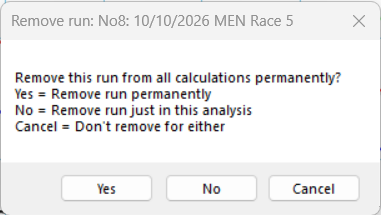
Once a points status has changed the ratings will recalculate.